What to Bring to a Ready-Made Agent's First-Flow Setup
Coming to your sales-assisted setup with approved business facts, caller details, and clear exception rules gets your ready-made phone agent live without friction.
When you choose a ready-made inbound phone agent instead of commissioning a bespoke custom build, you bypass months of engineering, custom scripting, and technical discovery. Rather than starting from a blank whiteboard, you pick a pre-built package designed for a common job—such as reception, appointment booking, support line handling, or after-hours coverage—and adapt a proven template to your business.
Under the Solutions HD phone service terms, you do not have to configure that starting flow alone: a sales agent helps establish the initial call flow, and there is no setup or onboarding fee.
However, a ready-made agent can only speak what you approve and route where you direct. If you arrive at your onboarding conversation without verified business facts, clear intake fields, or defined exception rules, the setup process slows down and your launch is delayed.
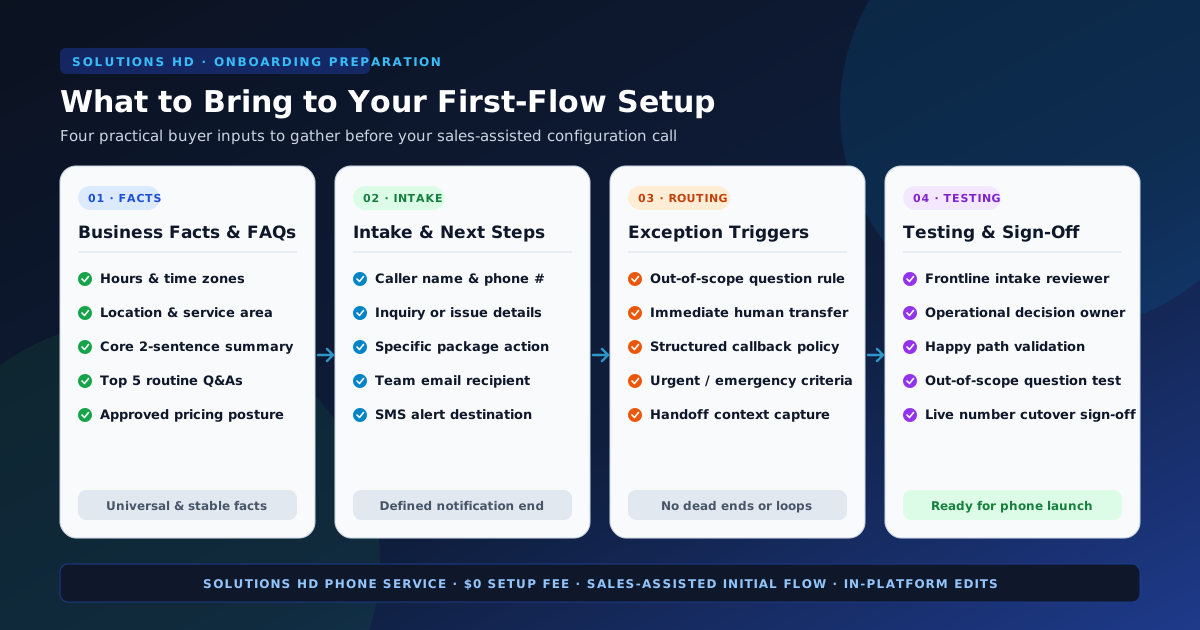
To get your first call flow live smoothly and accurately, you need to bring four practical inputs to your setup conversation:
- Approved business facts and standard answers for routine caller questions.
- Specific caller details and next-step actions for standard inquiries.
- Explicit exception triggers for calls that require human judgment or alternate routing.
- An internal review owner designated to test the flow before pointing your live phone number.
Here is exactly how to gather and structure each input before your initial setup call.
1. Gather your core business facts and approved standard answers
An AI phone agent represents your company on the first ring. It needs authoritative, approved answers to the basic questions callers ask every day. If you don't define these facts upfront, the agent cannot answer callers with confidence.
Before your setup conversation, compile a single reference sheet containing:
Essential operating details
- Exact business name and pronunciation: Include any trade names, acronyms, or specific phonetics so the greeting sounds natural.
- Operating hours and time zones: State standard opening and closing times for each day of the week, holiday closures, and whether your business operates across multiple time zones.
- Physical address, location guidance, or service area: If callers visit in person, provide parking instructions, suite numbers, or landmarks. If you operate as a field service, define your geographic service boundaries.
- Core service summary: A clear 2-to-3 sentence summary of what your business does—and what you explicitly do not do—so callers can be accurately qualified.
Approved answers for your top 5 routine questions
Most inbound lines receive the same handful of questions repeatedly. Identify your top five routine questions and write out approved, plain-English answers:
- "Where are you located, and what are your hours?"
- "What is your general pricing or inspection fee structure?" (Provide your standard answer, whether that is fixed pricing, a baseline diagnostic fee, or a statement that estimates require an in-person assessment.)
- "How does your intake or booking process work?"
- "What is your cancellation or rescheduling policy?"
- "What should I have ready before my appointment or consultation?"
Guiding Rule: Only document facts that are stable and universally approved. If a question requires evaluating a caller's individual history, negotiating pricing, or checking internal inventory, do not attempt to automate the answer. That question belongs in your intake or exception path.
2. Define caller intake details, next-step choices, and notifications
Once a caller is greeted and their initial inquiry is understood, what should happen next? A ready-made agent is designed around a structured next step, not open-ended conversation.
To configure your flow, determine exactly what information must be captured from the caller and where that information should go.
Caller details to capture
Keep your intake requirements focused. Asking callers for too many fields creates friction and lengthens call times. For most standard jobs, capture:
- Caller identity: Full name and callback telephone number.
- Relationship: New prospective customer versus existing client or account.
- Call objective: A concise summary of their specific request, inquiry, or issue.
- Contextual details: For appointment booking, their preferred day, time window, or specific staff provider. For support calls, their account reference, equipment type, or brief issue description.
Next-step actions by package type
The appropriate next step depends on the ready-made package you selected:
- Reception Agent: Greets callers in your brand voice, captures their intake details, provides common business facts, and routes the caller to the correct team member or takes a structured message.
- Appointment Booking Agent: Checks available schedule windows, books or reschedules appointments, and sends instant confirmations.
- Support Line Agent: Answers verified FAQ items from your approved reference sheet, captures issue details, creates support summaries, and routes unresolved technical issues to your team.
- After-Hours Cover Agent: Answers after hours, weekends, and holidays, screens for true emergencies versus routine inquiries, captures details for next-business-day follow-up, and dispatches urgent alerts.
Notification destinations
Where should call summaries and booking records be delivered? Prepare the exact delivery endpoints your team monitors:
- Email notifications: Specific team distribution inbox (such as
frontdesk@company.comorintake@company.com) for instant call transcripts and summaries. - SMS alerts: Designated mobile numbers for time-sensitive after-hours notifications.
- CRM / calendar handoff: Your team's shared booking calendar or webhook endpoint for structured intake records.
3. Set deliberate exception rules before you launch
A ready-made flow is only as dependable as its boundaries. As detailed in our guide on defining the exception path before choosing a package, successful phone automation does not pretend every caller fits the standard route. It establishes clear rules for when an agent should stop and hand off to a person.
Before your setup conversation, define three specific exception boundaries:
1. Unknown or out-of-scope inquiries
When a caller asks a complex question that is not in your approved business facts (for example, a custom service request, legal inquiry, or billing dispute), what should the agent say?
- Approved rule: The agent should politely state that the request requires staff review, capture the caller's details and question, and promise a team follow-up rather than guessing an answer.
2. Caller preference for a live person
What happens when a caller explicitly asks to speak with a human or expresses confusion?
- Approved rule: The flow should never trap callers in a repetitive loop. It should immediately offer an approved human handoff—either transferring to an available line or taking a detailed callback message if your team is unavailable.
3. Urgent or emergency situations
If your business handles time-sensitive requests (such as an after-hours property emergency, urgent patient symptom, or system outage), define the exact criteria that separate urgent calls from routine messages.
- Approved rule: Specify the exact keywords or criteria that qualify as an emergency, and provide the designated escalation phone number or priority notification channel.
4. Decide who inside your business reviews and tests the first flow
Before you point your business phone number to your new agent, someone on your team must test and verify the initial flow. Deciding who owns this step prevents uncoordinated feedback and ensures real-world alignment.
Assigning the review owner
The best review owner is rarely an executive who never answers the phone. Assign:
- The frontline intake lead: Your office manager, lead receptionist, or customer support supervisor. This is the person who knows how callers actually speak, what questions cause friction, and how intake notes should be formatted.
- The operational decision-maker: The owner or department head who can formally approve business policies, pricing disclosures, and handoff protocols.
Conducting the three-scenario test
During testing, your review owner should dial into the staging flow and run three concrete scenarios:
- The standard happy path: Call and request a routine appointment or ask a standard business question. Verify that the greeting is natural, the answer is accurate, and the intake details arrive promptly in your inbox.
- The unexpected question: Ask a question intentionally omitted from your reference facts (e.g., "Do you service appliances on Sunday evenings?"). Verify that the agent adheres to its boundary, does not fabricate an answer, and logs the inquiry cleanly.
- The human exception path: Ask for a live person or present an urgent issue. Verify that the handoff transfers correctly or that a high-priority alert is dispatched.
Once the review owner validates these three paths, your team can point your live inbound line with complete confidence.
5. How setup, pricing, and ongoing changes work
Understanding how Solutions HD handles onboarding, billing, and future adjustments helps you maintain your phone service without administrative surprises.
Predictable commercial terms
Solutions HD operates with clear, transparent subscription terms:
- Base subscription: The standard AI Phone Agent subscription is $249 per month, billed month to month.
- No setup or onboarding fees: There is no setup fee or onboarding fee ($0). Your initial call flow is established with sales-assisted support as part of starting service.
- Monthly usage allowances: Each monthly billing period includes 500 inbound minutes and 500 SMS text messages.
- Metered overages: If your call volume exceeds your monthly envelope, additional usage is billed at $0.15 per additional minute and $0.03 per additional SMS.
- Month-to-month flexibility: You can cancel before the end of your current billing period to prevent renewal for the next cycle. Service remains active through the paid period, and overage charges already incurred remain due. Refunds for prepaid monthly service are considered case by case.
Sales-assisted setup versus in-platform ongoing changes
How do initial setup and long-term maintenance divide responsibilities?
- At launch (Sales-Assisted): A sales agent helps you establish your initial call flow from proven templates based on the business facts, intake details, and routing rules you bring to the setup conversation.
- After launch (In-Platform & Support): As your business changes—such as updating your summer hours, adjusting your holiday greeting, or adding a new service FAQ—you can make updates directly in the platform. If you need additional assistance with your configuration, support is available to help.
There are no arbitrary launch SLAs, complex engineering retainers, or hidden change fees. You configure a proven template with expert help, maintain it easily in-platform, and keep your phone line covered around the clock.
6. Buyer-input worksheet: Your setup preparation checklist
Use this practical worksheet to collect your inputs before your setup conversation. Having these fields documented ensures your sales-assisted setup is efficient and comprehensive.
| Setup category | What to document before setup | Status / Notes |
|---|---|---|
| Business facts | Exact business name, pronunciation, address, operating hours, service area, and 2-sentence company summary. | Documented |
| Standard FAQs | Approved plain-English answers to your top 5 routine questions (hours, location, pricing posture, policies). | Documented |
| Caller intake fields | Exact fields required from caller (name, callback number, new vs. existing, brief issue summary). | Documented |
| Next-step action | Desired outcome per call (route to staff, book calendar slot, log support ticket, record after-hours note). | Documented |
| Notification destinations | Team email inboxes, SMS alert phone numbers, or webhook destinations for transcripts and summaries. | Documented |
| Exception rules | Explicit criteria for out-of-scope inquiries, requests for a person, and urgent emergencies. | Documented |
| Review owner | Designated frontline staff member and decision-maker responsible for testing the staging flow. | Assigned |
7. An illustrative scenario: How a mid-sized clinic prepares their appointment booking flow
To see how a team applies these preparation steps in practice, consider the following example:
Illustrative Example
A four-practitioner physical therapy clinic in Lincoln, Nebraska, selects the Appointment Booking Agent package to handle high morning call volumes and prevent missed appointment requests.
- Step 1: Gathering facts: The office manager documents the clinic's operating hours (Monday–Friday, 7:30 AM–5:30 PM), physical clinic address, and parking instructions. She writes approved answers for their top three FAQs: accepted insurance plans, cancellation notice requirements (24 hours in advance), and what new patients should bring to their first evaluation.
- Step 2: Defining intake & next steps: The clinic specifies four required intake fields: patient full name, date of birth, callback mobile number, and referring physician (if applicable). For booking, the agent is configured to access the clinic's scheduling calendar to offer available 45-minute evaluation slots. Confirmed bookings dispatch an email confirmation to the patient and alert the front desk inbox.
- Step 3: Setting exception rules: If a caller reports acute, severe post-surgical pain or an emergency, the agent is instructed not to schedule an evaluation; it immediately advises the caller to seek emergency medical attention and offers a direct phone transfer to the on-duty triage nurse. If a caller asks a billing or claims question, the agent takes a callback message for the clinic billing coordinator.
- Step 4: Testing & launch: Before pointing the main phone line, the lead receptionist calls the staging number three times: once to book a routine physical therapy slot, once with an out-of-network insurance question, and once simulating an urgent post-operative symptom. After confirming all three paths perform correctly, the clinic points its phone line to the agent.
This scenario is an illustrative example designed to demonstrate onboarding workflow preparation; it does not represent an actual customer endorsement, named integration, or specific patient transaction.
Take the next step with Solutions HD
A ready-made inbound agent gives your business 24/7 call coverage without the friction or expense of custom software development. By bringing approved business facts, clear intake choices, and explicit exception rules to your setup call, you ensure your first flow is reliable from day one.
- Ready to put an agent to work? Start AI Phone Agent service directly or browse our ready-made agent catalog.
- Reviewing our implementation approach? Read How Solutions HD Works.
- Still deciding which inbound job to address? Consult A ready-made agent checklist for common inbound jobs.
- Need guidance on routing boundaries? Explore Define the exception path before you pick a package.
- Have questions before purchasing? Check our FAQ or talk through your inbound call needs.