Changing a Ready-Made Agent After Launch
Keep your ready-made phone agent accurate by knowing which updates you can handle in-platform and when to reach out to support.
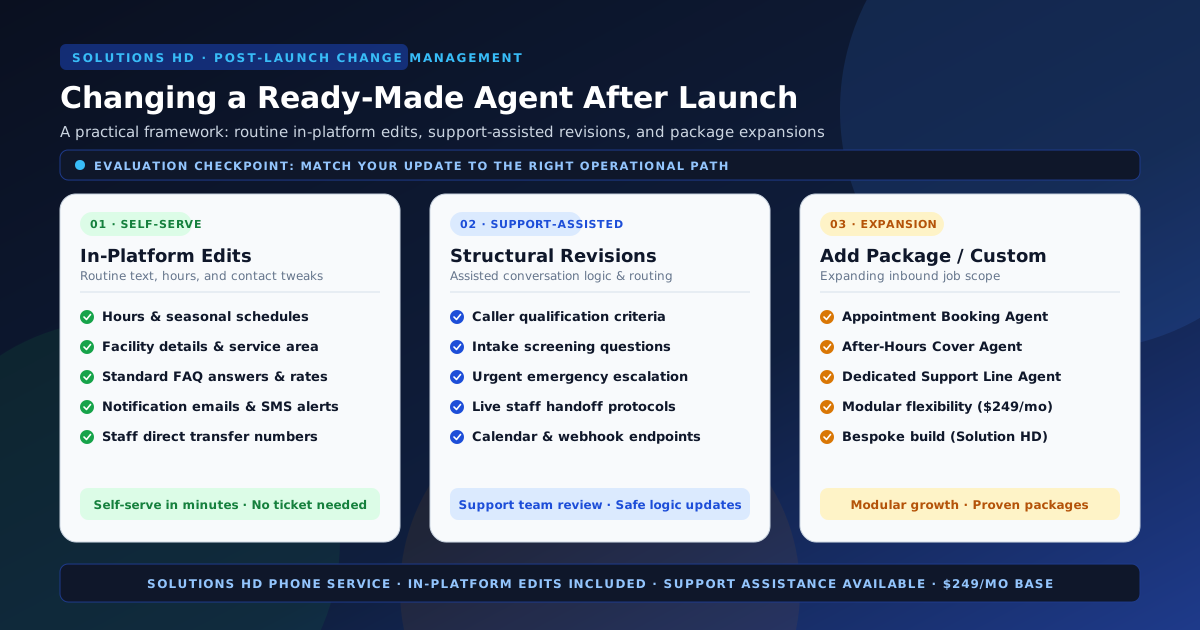
Launching a ready-made inbound AI phone agent gives your business immediate 24/7 call coverage without the overhead of custom software engineering. But no business stands still: operating hours shift with the seasons, service prices adjust, staff members change, and callers introduce questions you didn't anticipate on day one.
When your business evolves, how do you update your phone agent without breaking a working call flow?
Under the Solutions HD Terms of Service, call flow management follows a clear lifecycle: a sales agent helps establish the initial call flow at launch, later changes can be made in the platform, and support is available for additional assistance.
The key operational decision after launch is knowing which category your update falls into:
- In-platform self-serve edits: Routine text, schedule, and contact adjustments that you can make directly in the platform in minutes.
- Support-assisted updates: Structural workflow changes, logic adjustments, or exception restructuring that benefit from support review.
- Package additions or bespoke builds: Expanding beyond your current inbound job by adding another ready-made agent package or recognizing when a workflow requires a custom build.
Here is how to evaluate your change, implement it smoothly, and maintain call reliability without administrative friction.
1. Routine updates you can make directly in the platform
Most post-launch adjustments do not require technical intervention. They are simple operational data updates: your business hours changed, you added a new team member's transfer number, or you refined the wording of a standard customer answer.
These routine text and routing tweaks are designed for in-platform self-service. You do not need to wait for a support ticket or schedule a meeting to keep your agent current.
Operating hours and seasonal schedules
Your phone agent relies on verified schedule rules to distinguish normal business answering from after-hours handling. In-platform updates include:
- Permanent hours changes: Adjusting your opening or closing times across any day of the week.
- Holiday closures: Setting specific dates where standard daytime routing switches to holiday greetings and message intake.
- Seasonal schedule shifts: Updating hours for summer operating periods or weekend coverage.
Approved business facts and FAQ answers
If your business changes an administrative policy or pricing posture, your agent's answers should reflect that update immediately. Common self-serve content edits include:
- Facility details: Updating physical address guidance, parking instructions, suite numbers, or service-area boundaries.
- Standard pricing disclosures: Modifying baseline service rates, diagnostic fees, or general estimate policies.
- Routine business policies: Updating cancellation windows, accepted payment methods, or required intake documentation.
Notification destinations and transfer numbers
Keeping caller summaries and transfers flowing to the right personnel is essential:
- Email recipients: Adding or updating the team distribution inboxes that receive call summaries and audio transcripts (e.g., updating
frontdesk@company.com). - SMS alert numbers: Changing the mobile telephone numbers designated for urgent notifications or after-hours text alerts.
- Staff transfer destinations: Updating the direct telephone number for a department or team lead when personnel changes occur.
Operational rule: After making any self-serve edit in the platform, place a test call to your inbound line. Ask the specific question you updated or trigger the modified transfer path to confirm the change is live and accurate before real callers encounter it.
2. Structural changes that warrant contacting support
While text and contact fields are easily edited in-platform, other changes alter how a conversation flows, how callers are qualified, or how exceptions are escalated. Making structural modifications without review can inadvertently create dead-end loops or drop caller context.
For structural changes, reaching out to Solutions HD support—via email at support@solutionshd.com or through the website contact form—ensures the logic is updated safely.
Modifying caller qualification criteria
If your marketing targets a new customer profile or your intake requirements change, the qualifying logic must adapt. Examples include:
- Adding or removing required screening questions before a caller is offered an appointment.
- Differentiating between new prospective clients and existing accounts based on custom criteria.
- Adjusting intake thresholds for high-value leads versus general inquiries.
Restructuring human exception and escalation paths
A ready-made agent's most critical boundary is its exception path. When the rules for handing off a call to a live person need adjustment, support assistance helps preserve call safety:
- Urgent escalation criteria: Redefining what constitutes an emergency (e.g., distinguishing an urgent property leak from a routine maintenance request).
- Handoff protocols: Changing what happens when a live staff member does not answer a transfer (e.g., switching from voicemail to structured callback intake).
- Multi-department triage: Introducing routing branches between multiple operational teams (e.g., sales intake versus billing support).
Integration endpoints and booking parameters
If you modify external software connected to your phone flow:
- Updating calendar booking integration endpoints, availability buffers, or appointment types.
- Changing webhook destinations that deliver structured caller records to internal systems.
How to submit a clear change request
To get your support request handled efficiently without back-and-forth delays, prepare a concise change summary:
- State the existing flow: Quote the current agent prompt, rule, or transfer behavior.
- State the requested replacement: Provide the exact wording, criteria, or destination you want implemented.
- Define the exception: Clarify what the agent should do if the caller does not meet the new criteria.
- Designate a reviewer: Identify who on your team will test the updated flow once support confirms the adjustment.
Expectation boundary: Solutions HD provides support assistance as outlined in the Terms of Service. Support is available to help maintain your configuration; however, the service does not include bespoke custom software engineering or unverified turnaround SLAs. Requests are handled systematically within standard business operations.
3. When a change exceeds a single ready-made agent
Sometimes an operational change cannot be solved by editing prompts or contacting support. As a business expands, the fundamental job required of the phone line may outgrow the original package.
Recognizing when an inbound need exceeds your current agent prevents trying to force one standard tool to do two incompatible jobs.
Option A: Adding another ready-made package (The Growth Path)
As outlined in How Solutions HD Works (Step 04 / GROW), the productized model allows businesses to add agent coverage as needs grow:
- The Reception Agent outgrows scheduling: If your Reception Agent handles basic inquiries well, but appointment volume increases to where callers need automated calendar booking, you can add an Appointment Booking Agent or transition your primary line to that package.
- Daytime answering needs 24/7 coverage: If your daytime staff handles routine calls but after-hours calls are going unanswered, adding an After-Hours Cover Agent provides dedicated screening and urgent escalation without altering your daytime office routines.
- Support volume overwhelms intake: If technical questions dominate your reception line, adding a dedicated Support Line Agent on a separate direct number keeps front-desk intake focused on new business.
Each ready-made package operates under standard subscription terms ($249/month, month to month, with 500 included minutes, 500 SMS, and $0 setup fee), giving you modular flexibility without long-term commitments.
Option B: Recognizing when you need a custom build
Ready-made agents succeed because they follow proven, repeatable templates. If your operational vision requires:
- Deep multi-system CRM database queries during a live conversation,
- Dynamic pricing algorithms that calculate bespoke quotes mid-call,
- Complex multi-tiered telephony trees with conditional multi-branch routing,
then you have moved beyond productized ready-made agents. For highly customized, consultative call-flow engineering, a custom development engagement—such as that provided by sibling brand Solution HD—is the appropriate path. Knowing this boundary saves your team time and prevents frustrating technical workarounds.
4. Change-management decision matrix: In-platform vs. Support vs. New package
Use this practical reference table to categorize your post-launch update and identify the right action path:
| Change scenario | Operational category | Recommended resolution path | Preparation needed |
|---|---|---|---|
| Update holiday or summer operating hours | Routine schedule tweak | In-platform self-serve | Exact open/close hours and effective dates. |
| Revise standard service pricing disclosure | Routine FAQ content update | In-platform self-serve | Approved plain-English pricing or diagnostic fee text. |
| Add new receptionist email for call summaries | Notification endpoint tweak | In-platform self-serve | Verified email address monitored by front-desk staff. |
| Change staff mobile number for live transfers | Contact routing update | In-platform self-serve | Working direct phone number with active voicemail. |
| Add screening question for new vs. existing clients | Intake qualification logic | Contact support | Exact wording of question and allowed caller responses. |
| Restructure emergency HVAC / leak escalation | Exception path redesign | Contact support | Specific emergency criteria and designated escalation line. |
| Update shared calendar booking integration | Workflow integration update | Contact support | Calendar connection details and available booking slots. |
| Add 24/7 after-hours line to existing daytime reception | Expanding inbound scope | Add agent package | Selection of After-Hours Cover Agent via catalog or support. |
| Build dynamic multi-branch database lookup flow | Bespoke engineering | Custom build path | Discovery consultation for custom architecture (e.g., Solution HD). |
5. An illustrative scenario: Managing seasonal changes after launch
To see how an active business applies this framework in practice, consider the following labelled illustrative example:
Illustrative Example: Apex Heating & Air
The background: Apex Heating & Air is a residential mechanical contractor that launched a Solutions HD After-Hours Cover Agent ahead of the winter season. The initial flow was configured with sales assistance to screen calls between 6:00 PM and 7:00 AM, capturing non-urgent service requests for morning callback and live-transferring true heating emergencies (complete heat failure in freezing temperatures) to an on-call technician.
Two months after launch, Apex encounters three distinct operational changes:
- Change 1: Updating emergency technician on-call phone numbers.
The need: The company rotates its primary on-call technician monthly.
The decision: This is a routine contact routing update. Apex's office manager logs into the platform, enters the new technician's cell phone number in the transfer settings, saves the change, and places a quick test call to verify that the transfer rings the new phone.
Resolution: Handled in-platform in under three minutes without support intervention. - Change 2: Refining emergency screening criteria.
The need: Technicians report that callers are triggering emergency transfers for routine furnace filter questions, while legitimate commercial boiler issues are being logged as non-urgent messages.
The decision: This alters caller qualification logic and exception thresholds. Apex's service manager emailssupport@solutionshd.comwith a clear revision note: "Please update our after-hours qualification prompt so that filter inquiries are classified as routine messages, and add commercial property heating failure to our emergency transfer criteria."
Resolution: Solutions HD support updates the underlying template logic. Apex's service manager dials the test line to run the two revised caller scenarios, confirming the new rules work accurately before putting them live. - Change 3: Adding automated daytime tune-up booking.
The need: As spring approaches, Apex wants to launch a seasonal AC tune-up campaign. The daytime office staff is overwhelmed by booking calls, but Apex does not want to alter its proven after-hours emergency flow.
The decision: This is not a text tweak or a support adjustment—it is an entirely new inbound job. Rather than complicating the after-hours agent, Apex adds an Appointment Booking Agent from the Solutions HD catalog on a dedicated promotional number.
Resolution: Apex adds the package under standard subscription terms ($249/month, $0 setup fee), configuring daytime booking while keeping its after-hours cover untouched.
This scenario is an illustrative example designed to demonstrate post-launch change management; it does not represent an actual customer endorsement, named integration, or guaranteed business outcome.
6. Commercial terms governing ongoing operations
Understanding how Solutions HD structures billing and ongoing service ensures your team manages its phone operations with complete clarity:
- Base subscription: The standard AI Phone Agent subscription is $249 per month, billed month to month.
- Zero setup or onboarding fees: There is no setup or onboarding fee ($0). Sales-assisted onboarding is included at launch.
- Monthly usage allowances: Each billing cycle includes 500 inbound voice minutes and 500 SMS text messages. In-platform configuration changes and routine support assistance do not consume usage minutes; minutes are consumed solely by inbound caller airtime.
- Predictable metered overage: Usage beyond the monthly allowance is billed at $0.15 per additional minute and $0.03 per additional SMS.
- Month-to-month flexibility: You can cancel before the end of your current billing period to prevent renewal for the next cycle. Service continues through the paid period, and incurred overages remain payable. Prepaid monthly service refunds are evaluated case by case.
- No change fees or maintenance retainers: Making in-platform edits is included at no additional cost. Routine support assistance is available under your subscription without per-ticket engineering fees, provided the request remains within the ready-made agent's standard package scope.
Summary: Keeping your phone agent aligned with your business
A ready-made inbound AI phone agent is not a rigid, static script, nor is it an open-ended custom coding project. It is a dependable, productized tool designed to handle common inbound jobs reliably.
By handling routine text, hour, and contact updates directly in-platform, engaging support for structural logic and qualification changes, and adding packages when your inbound jobs expand, you keep your phone coverage accurate, professional, and responsive.
- Need assistance with an existing agent? Reach out through our support contact form or email
support@solutionshd.com. - Reviewing your subscription terms? Read the complete Terms of Service.
- Preparing for an upcoming launch? Consult What to Bring to a Ready-Made Agent's First-Flow Setup.
- Looking to expand coverage? Explore our ready-made packages on How Solutions HD Works or browse the agent catalog.